← all tools
sound
blip
stop scrubbing for the loud part. sounds land with their peak on the playhead.
$10+windowsafter effects 2023 or later
pairs with knockneed a sound you don't have? knock makes ui sounds right in the comp.
what it does9 things
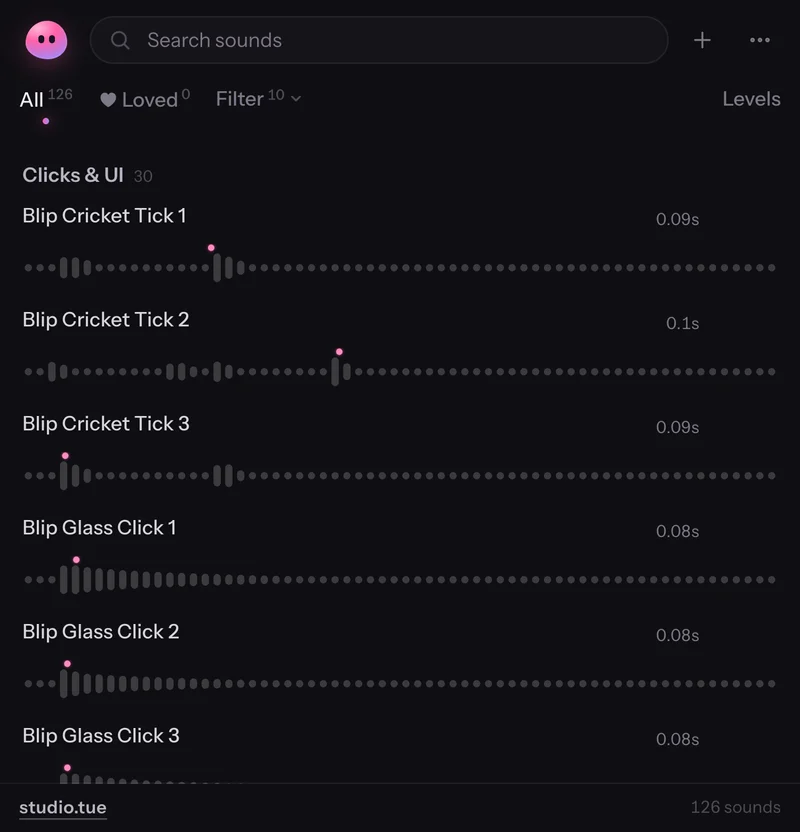
blip puts your sound effects inside after effects. search by name, folder or pack, click a row to hear it, click the waveform to jump around. the pink dot marks the peak.
double-click and the sound goes into your comp with its peak on the playhead, named and labelled. it comes with 126 starter sounds, including 27 blip originals, and reads your own library too: wav, mp3, aif, flac, m4a and ogg.
- peak on the playheaddouble-click, enter or ⤓ places the sound so its loudest moment lands on the playhead.
- every beatshift+enter drops one copy on every selected keyframe, or every marker, in one undo. variations cycle.
- variation packsthe takes are numbered on the waveform. hear just one with 1–9, and place it already trimmed.
- match loudnesslevels each sound against the loved sounds in its folder. the levels tab shows the dB each one lands at.
- find it fastall, loved, and a filter for folder, most used, shortest, longest, newest, or only what's in this project.
- tidy the libraryfavourite, rename, move and recycle from the panel. nothing is deleted for good, it goes to the recycle bin.
- relink old projectsevery rename or move is logged, and the open project is relinked right away.
- your sounds stay putthe library lives in documents\blip\sounds, or any folder you pick, so updates never touch it.
- blip himselfthe little guy in the corner reacts to every sound on its peak.
watch it35 seconds
what you need
- price
- $10, pay what you want above that
- version of ae
- after effects 2023 or later
- platform
- windows
- type
- cep panel, signed
- sounds
- 126 starter sounds (27 blip originals), plus your own: wav, mp3, aif, flac, m4a, ogg
installing it3 steps
- install the zxpuse the free zxp/uxp installer with
Blip.zxpfor a one-click install. - or drag it inunzip the drag-install zip and copy the
Blipfolder into%APPDATA%\Adobe\CEP\extensions\. - restart after effectsthen open it from window → extensions → blip, and add sounds with the + button.
your sounds live in documents\blip\sounds, outside the panel, so installing a new version never touches them.
questions5
- how much is blip?
- $10, and pay what you want above that if you like it. one licence covers all your own machines, commercial work included.
- does it come with sounds?
- yes, 126 starter sounds, copied into documents\blip\sounds the first time you open it. 27 are blip originals, made for blip by studio.tue; the other 99 are public domain (cc0). use any of them in your own work, commercial included, no credit needed. add your own with the + button, or drop them into that folder and rescan.
- does it work on mac?
- no. blip is windows only, for after effects 2023 or later.
- what does match loudness do?
- it levels each sound against the loved sounds in its folder, so a new whoosh sits at the same level as the ones you already use.
- will an update wipe my sounds?
- no. the library lives in documents\blip\sounds (or a folder you pick), outside the panel's own folder.