knock
make the sound instead of hunting for it.
what it does8 things
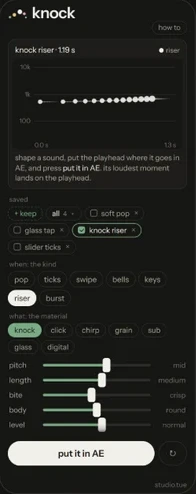
knock is a panel for after effects and premiere pro that makes ui sound effects for your motion. shape a sound, put the playhead where it goes and press one button: it lands on its own layer with its loudest moment right on the playhead.
pick a kind and a material, shape it with five bars, roll another take, and keep the ones you like in folders you make, ready for every project.
- 7 kinds × 16 materialspop, ticks, swipe, bells, keys, riser and burst, made of taps, grains, liquid, whoosh or bits.
- five barspitch, length, bite, body and level. ↻ rolls another take of the same sound.
- the sound as dotsmove, add, delete or re-pitch any single one.
- one button puts it inpeak on the playhead, on a new layer right above the one you have selected in after effects, or on the first free audio track in premiere.
- nothing gets coveredit never lands on top of anything, and a placed sound never changes.
- keep the good onesin folders you make, ready for every project.
- works with blipthe sounds you keep show up in blip's library under knock sounds.
- yours to usethe sounds you make are yours: any work, commercial included, no credit needed.
make a few sounds, freein your browser
not knock itself, a free taste of it: the ui sound maker, right in your browser. preset voices, slider moves and shapes for ticks, grains, liquid and digital sounds. bend them with pitch, roll a new take, and save any of them as a wav. knock is the full version, inside after effects and premiere.
what you need
- price
- $10, pay what you want above that
- version of ae
- after effects 2023 or later
- premiere
- premiere pro 2024 or later
- platform
- windows
- type
- cep panel, signed
- included
- a zxp and a drag-install zip for after effects, the same for premiere, and a 3-page how-to
installing it3 steps
- install the zxpuse the free zxp/uxp installer with
Knock.zxp, orKnock-for-Premiere.zxpfor premiere, for a one-click install. - or drag it inunzip the drag-install zip and drag the folder into your adobe cep extensions folder,
%APPDATA%\Adobe\CEP\extensions\. - restart and open itrestart after effects or premiere, then open it from window → extensions → knock.
the 3-page how-to that comes with it walks through everything in the panel.
questions6
- how much is knock?
- $10, and pay what you want above that if you like it. one licence covers all your own machines, commercial work included.
- does it work in premiere pro?
- yes. there's a version for after effects 2023 or later and one for premiere pro 2024 or later. in premiere the sound goes on the first free audio track.
- does it work on mac?
- no. knock is windows only.
- can i use the sounds in commercial work?
- yes. the sounds you make are yours: use them in any work, commercial included, no credit needed.
- does it work with blip?
- yes. the sounds you keep in knock show up in blip's library under knock sounds.
- is the free tool on this page knock?
- no. the free tool is a taste in your browser: preset voices, moves and shapes you can bend with pitch and save as wavs. knock is the full panel inside after effects and premiere, with its own 7 kinds, 16 materials and five bars, and it puts the sound on the playhead for you.