how it works, with sounds
a tour of the tool above, one tab at a time. every example here plays when you press it, made right in your browser by the tool's own engine. headphones help: a lot of the difference lives in the low end.
four tabs, two kinds of sound
ticks is the sound of something sliding past notches: sliders, scrubbers, dials, toggles. it knocks once per notch, so a faster move ticks closer together and louder.
grains, liquid and digital make transition sounds out of many tiny sounds a few thousandths of a second long: zips, sparkles, splashes, drips, buzzing and beeping. they're for things opening, closing, landing and loading.
the quick start
- pick a tab and a voice. the voices are down the left side (across the top on a phone).
- hear it. on ticks, drag the fader or press a move. on the other tabs, press play.
- bend it. turn pitch to move the voice higher or lower. that makes a custom copy of the voice you were on.
- save it. a wav, ready for after effects or anything else. how to line it up.
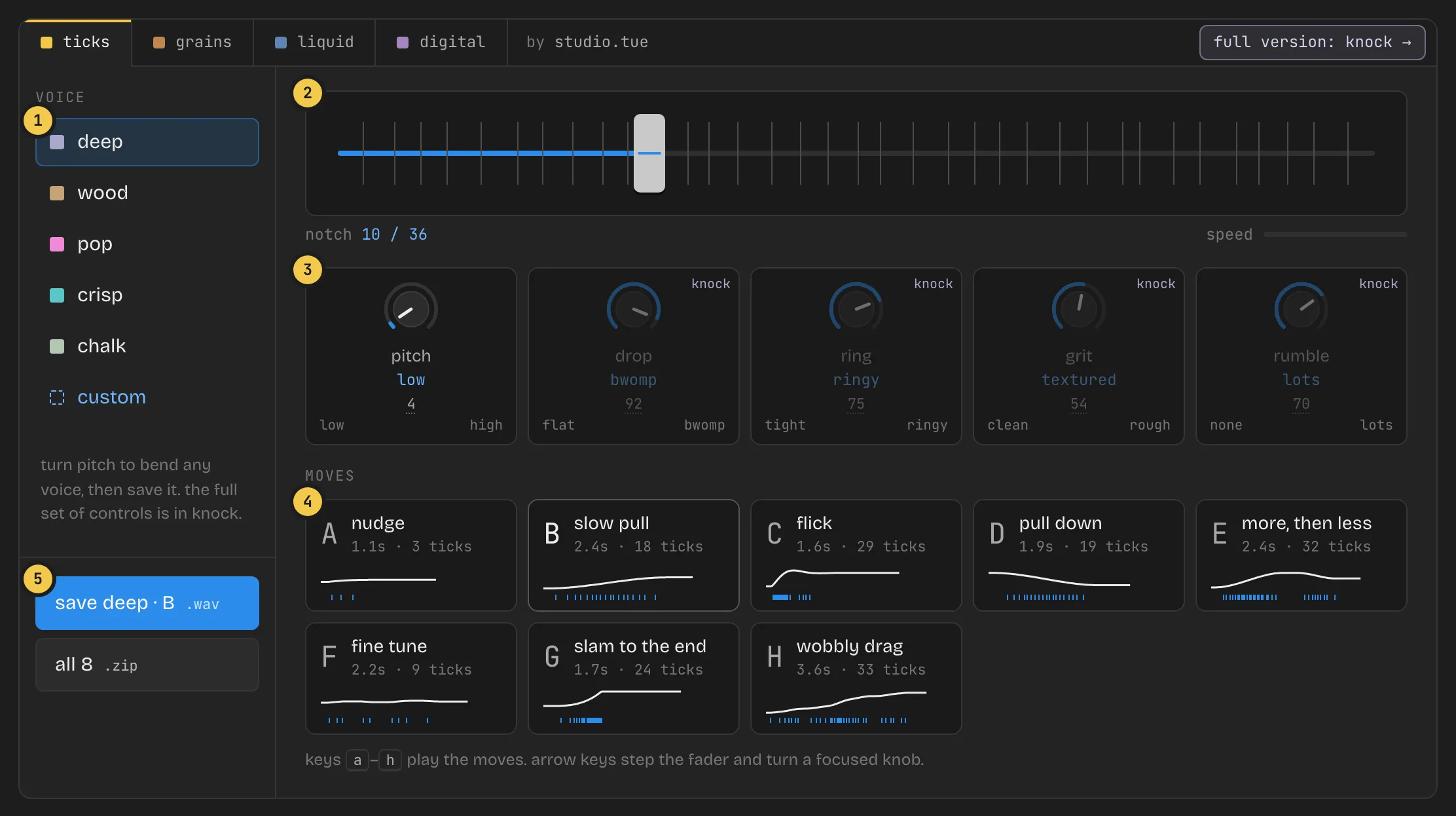
- five voices
- the fader: drag it and it ticks
- pitch to bend the voice (the other knobs are knock's)
- eight moves to save
- save one sound, or all eight in a zip
the fader
drag it and it knocks once for every notch it passes, 36 along the track. the faster you go, the closer and louder the ticks, and the pitch climbs a little toward the right end. slam into either end fast enough and it thuds. arrow keys step it one notch at a time.
the fader is for listening. what you save is a move: a recorded drag, on the moves tab.
five voices
- deep low, bwomp, ringy, with lots of rumble. heavy and soft, like a big dial.
- wood mid, a little bend, textured. a knock on something wooden.
- pop high-ish, clean and round, with an extra overtone and a little puff of air.
- crisp high, flat and tight, with a sharp click and a little bell on top.
- chalk like crisp but lower and drier: tight, with the same click and bell.
pitch
pitch is the note each knock settles on, from about 40 hz up to 3 khz. drag the knob up or right, scroll over it, use the arrow keys, or click the number under it and type 0 to 100. each step plays a tick so you hear where you are.
the first turn makes custom, a copy of the voice you were on at the new pitch. turn pitch on another voice later and custom starts over from that one, but bring back the old one swaps your last custom straight back.
the other four knobs (drop, ring, grit and rumble) show where each voice sits. the free version turns pitch; knock has its own five bars for shaping sounds.
wood playing the flick, pitch low and high.
the eight moves
each one is a hand on the slider, recorded. the pad draws its path and puts a mark under every tick. keys a to h play them. here they are in wood:
- A · nudge a small push, 3 ticks
- B · slow pull steady, 18 ticks
- C · flick fast out, settles back, 29 ticks
- D · pull down steady, the other way, 19 ticks
- E · more, then less out and part way back, 32 ticks
- F · fine tune little steps with pauses, 9 ticks
- G · slam to the end speeds into the end and thuds, 24 ticks
- H · wobbly drag a long uneven hand drag, 33 ticks
slam to the end is the one that thuds: it reaches the end of the slider still speeding up. the others ease in and stop. all 8 saves every move in the voice you're on as one zip.
moves you drew and kept here before still show up after the eight, and play and save like them.
three tabs, one panel
grains, liquid and digital share the same controls. each voice is a mix of tiny sounds, and the particle view shows every one of them.
- zip grains quick downward zips over a low body thump.
- sparkle grains bright little blips that climb, with a few zips.
- crackle grains clicks in short bursts, with a few blips.
- splash liquid bubbles over a low body, with a long wet tail.
- drip liquid a few slow, round bubbles.
- fizz liquid lots of tiny, high, quick bubbles.
- bug digital clicks over an insect buzz.
- signal digital beeps on a steady clock, with a buzz locked to it and a few bubbles.
- data digital beeps on a fast clock, like data going by.
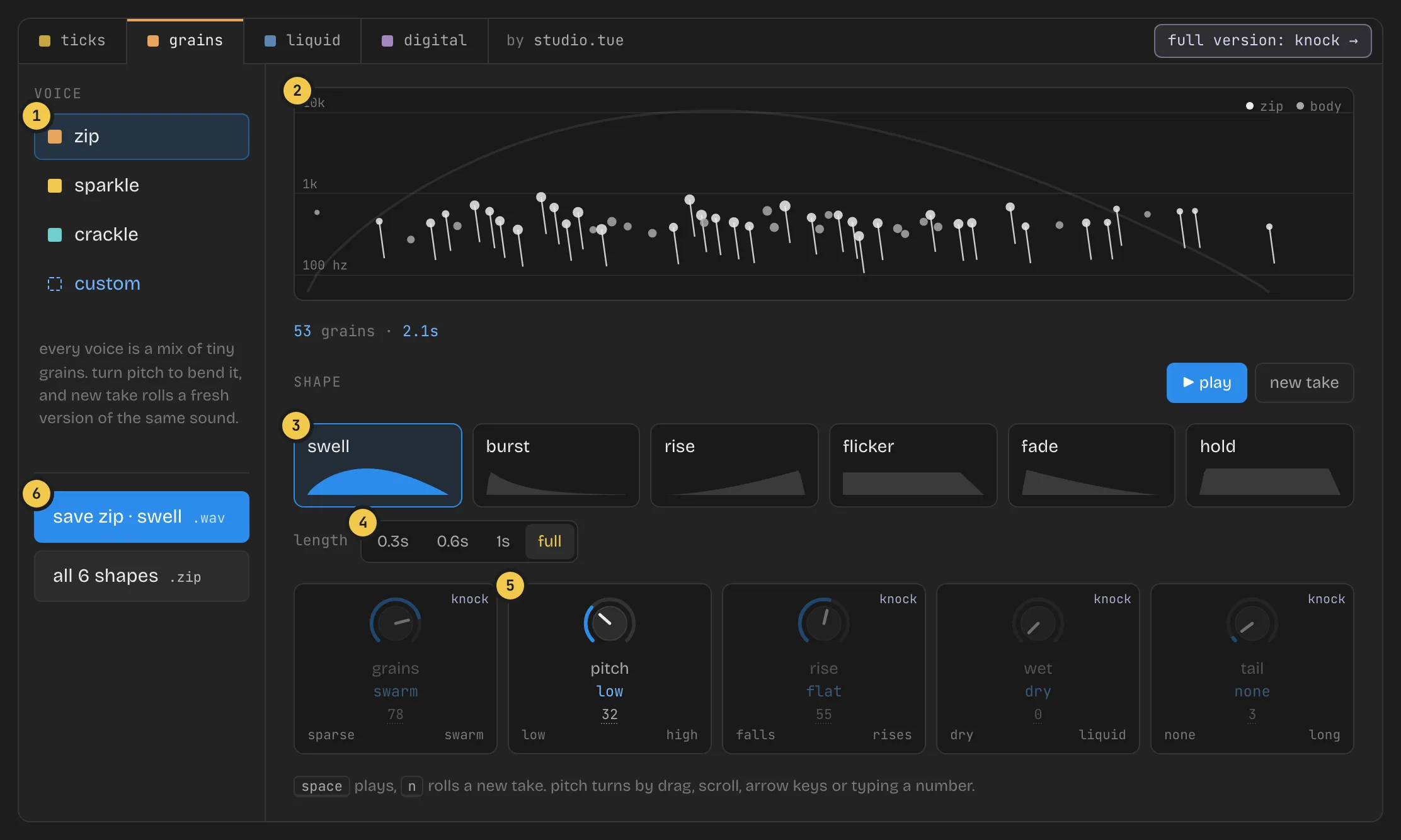
- voices for this tab
- the particle view, with what's in it at the top right
- six shapes
- length
- pitch (the other knobs are knock's)
- save one shape, or all six in a zip
the particle view
every dot is one grain. left to right is time, bottom to top is pitch (100 hz to 10 khz), and bigger dots are louder. zips and bubbles get a little stroke showing which way they bend. the faint curve is the shape. the corner names the grain types in this sound: zip, blip, click, bubble, beep and body (a low thump). while it plays, the grains light up as they go.
shapes
a shape is how the grains spread over time. here's zip through all six:
- swell 2 s comes in, peaks, goes out.
- burst 1.6 s everything at once, then it decays.
- rise 1.5 s builds to the end and stops.
- flicker 1.8 s steady, chopped on and off. signal and data keep their own clock, so on those it plays steady.
- fade 1.8 s starts strong and fades out.
- hold 1.2 s steady and even the whole way.
length
0.3s, 0.6s and 1s squeeze the shape into that time, a little denser so it keeps its texture. full is the shape's own length. each voice's tail still rings on after, so a file can run a bit longer than the length you pick. sparkle, rise:
pitch
pitch moves where the grains sit, from about 180 hz to 4 khz in the middle of the sound. the other four knobs (grains, rise, wet and tail) show where each voice sits; the free version turns pitch.
zip, 1 second, pitch low and high.
new take
same sound, a fresh roll of the grains. takes are fixed, so take 3 is always the same take 3, and the take number goes in the file name. n rolls one, space plays. turning pitch plays the sound when you let go. drip, burst:
where things are kept
the page remembers your tab, voice and settings in this browser, on this device. nothing is uploaded. voices and moves you kept here before are still in their lists, and play and save like the rest; remove voice lets one go (press it twice).
keeping new voices, drawing moves and kit files aren't part of the free version. knock keeps the sounds you make in folders, ready for every project.
saving
on ticks, the save button names what you'll get, like save deep · B. all 8 saves the eight built-in moves in that voice as one zip. on grains, liquid and digital, save gets the shape you're on, and all 6 shapes zips every shape at your length and take.
every file is a 24-bit, 48 khz mono wav, leveled to sit just under full scale (on ticks, the gentle moves stay a little
quieter than the slams). names say what's inside: deep-B-slow-pull.wav,
liquid-splash-burst-300ms-take2.wav. zips add licence.txt, and recipe.txt with the
knob spots, so you can dial the sound back in (on ticks, for custom, kept voices and chalk).
using them
free in your own work, commercial included: videos, motion graphics, games, apps and websites. no credit needed. the one thing that isn't allowed is selling or sharing the sounds themselves, as a sound pack, a library, or part of another tool. every file carries studio.tue in its info. the full wording is in the terms.
into your comp
- import it. ctrl+i (cmd+i on a mac), or drag the wav into the project panel.
- put it in the comp. drag it from the project panel into the timeline.
- see it. select the layer and press l twice to show its waveform. the sounds start with a sliver of quiet: a move holds still for a moment before its first tick, and a swell or rise builds before its loudest part. line up the part you hear, not the layer's first frame.
- line it up. put the playhead where the motion lands (j and k jump between keyframes and markers). [ moves the sound layer's start to the playhead; then drag the layer until the spike in its waveform sits under the playhead. shift-drag snaps a layer to markers.
- hear it. the spacebar preview plays audio. if it's silent, check include audio and mute audio in the preview panel.
- set the level. l once shows audio levels, in db. ui sounds usually sit well under music and voice; keyframe the level to fade one out.
- trim it. alt+[ and alt+] (option on a mac) trim the layer's start and end to the playhead, handy for cutting a tail short.
or skip the scrubbing
knock makes the sound inside after effects or premiere and puts it in for you: one button, and it lands on its own layer with its loudest moment on the playhead. $10+ · pay what you want.
blip does the same for sounds you already have: double-click one and it lands with its peak on the playhead. $10+ · pay what you want. both windows.
there's no rule book. these are starting points that tend to work, each one a few clicks away in the tool.
ticks: the move closest to your animation (see moves). wood or pop for light ui, deep for something heavy.
ticks: the nudge move, three quick ticks. crisp or chalk keep it short.
grains: zip with swell or rise, at 0.3 or 0.6 s.
zip with fade, short. pitch it down a little so it heads out.
sparkle with rise. it climbs on its own.
drip or signal with burst, short.
data with hold, as long as the wait.
splash with burst.
a few habits
- match the length to the motion. the length row on grains, liquid and digital, or a short move like nudge or flick on ticks.
- put the loud part where the motion lands, not where it starts.
- quieter than you think. ui sounds work best a little under everything else.
- one family per piece. keep one voice and use it everywhere. for things that repeat, new takes give the same sound with a little variety.
- up for in, down for out. pitch a little higher for opening and good news, a little lower for closing.
knock, the full version
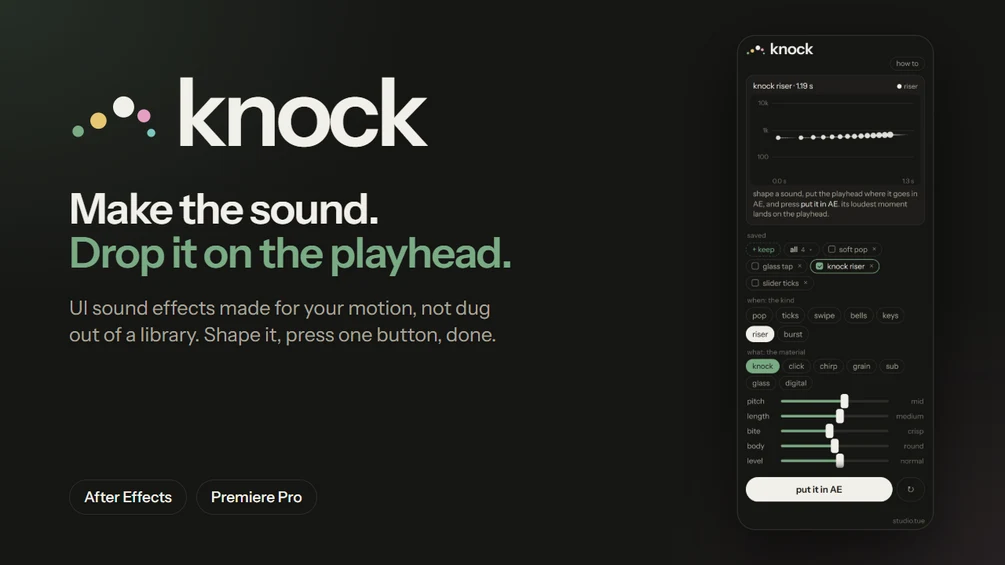
knock is a panel for after effects and premiere pro that makes ui sound effects for your motion. shape a sound, put the playhead where it goes and press one button: it lands on its own layer with its loudest moment right on the playhead.
- 7 kinds × 16 materials. pop, ticks, swipe, bells, keys, riser and burst, made of taps, grains, liquid, whoosh or bits.
- five bars. pitch, length, bite, body and level. ↻ rolls another take of the same sound.
- the sound as dots. move, add, delete or re-pitch any single one.
- one button puts it in. peak on the playhead, on a new layer right above the one you have selected in after effects, or on the first free audio track in premiere.
- nothing gets covered. it never lands on top of anything, and a placed sound never changes.
- keep the good ones. in folders you make, ready for every project.
after effects 2023 or later or premiere pro 2024 or later, windows. $10+ · pay what you want.