← all tools
pocket
tidy and timing
folders for your timeline. nothing gets precomposed.
$10+windows, macafter effects 2023 or later
pairs with nullifylayer names that write themselves, from their effects, parent and mattes. tidy names inside tidy pockets.
what it does9 things
after effects still has no layer folders, so long comps turn into a wall of layers or a pile of precomps. pocket puts layers in a pocket right in your timeline: close it to tidy them away, open it to work.
every layer stays in your comp, with its effects, parenting and expressions untouched, and renders exactly as before. your project opens and renders the same on a machine without pocket: the headers are just empty guide layers.
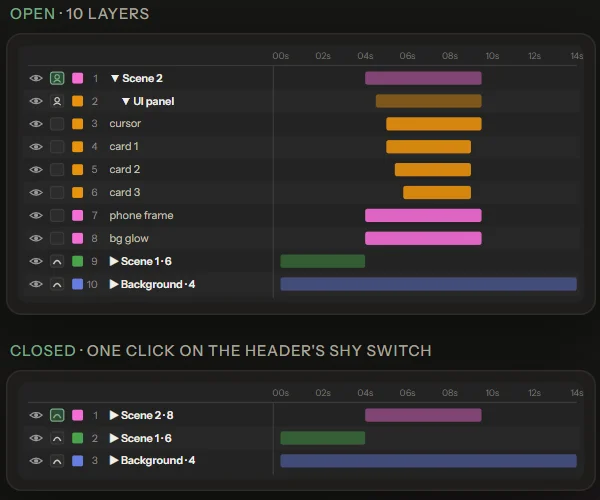
- pockets in the timelinea header layer above its layers. click the header's shy switch to open or close it.
- pockets inside pocketsa scene, its ui panel, the cards in it.
- drag in and outright in the timeline. drag a header and everything inside comes along; slide its bar and the whole pocket moves in time.
- the header runs the pocketits eye, solo and lock work on everything inside. ctrl+d (cmd+d on a mac) on a header copies the whole pocket.
- label colorseach pocket colors its layers in its label color, and gives them their own color back when they leave.
- unpackturn a precomp back into layers, in a pocket, exactly where they were. expressions and layer links follow.
- scene markerseach pocket gets a comp marker that follows it.
- the pocket keyone key that opens and closes a pocket, or makes a new one from the selected layers. the panel sets it up for you.
- a panel of folder tabsevery pocket as a folder tab, and a how-to window with settings.
what you need
- price
- $10, pay what you want above that
- version of ae
- after effects 2023 or later
- platform
- windows, mac
- type
- cep panel, signed
- included
- a .zxp and a drag-install zip for windows and for mac, and a 3-page how-to
installing it3 steps
- install the zxpuse the free zxp/uxp installer with
Pocket.zxpon windows orPocket-Mac.zxpon mac, for a signed one-click install. - or drag it inunzip the drag-install zip and drag the
Pocketfolder into%APPDATA%\Adobe\CEP\extensions\on windows, or~/Library/Application Support/Adobe/CEP/extensions/on mac (finder → go → go to folder). - restart after effectsthen open it from window → extensions → pocket. it sets up the pocket key for you.
the 3-page how-to that comes with it walks through everything in the panel.
questions8
- does after effects have layer folders?
- not built in. the only grouping after effects has is precomposing, which moves the layers into another comp. pocket adds folders to the timeline itself: a header layer above its layers that opens and closes, and nothing gets precomposed.
- how do i group layers in after effects without precomposing?
- select them and make a pocket. they stay in your comp with their effects, parenting and expressions untouched; close the pocket to tidy them away and open it to work. there's also a guide to grouping layers by hand.
- is a pocket a precomp?
- no. every layer stays in your comp and renders exactly as before. the pocket is a header layer above them, and its eye, solo and lock work on everything inside.
- can i turn a precomp back into layers?
- yes, that's unpack: it turns a precomp back into layers, in a pocket, exactly where they were. expressions and layer links follow.
- what if i send the project to someone without pocket?
- it opens and renders the same. the headers are just empty guide layers.
- can i put a pocket inside a pocket?
- yes. a scene, its ui panel, the cards in it.
- does it work on mac?
- yes. pocket runs on windows and mac, after effects 2023 or later. each has its own signed .zxp and drag-install zip.
- how much is pocket?
- $10, and pay what you want above that if you like it. one licence covers all your own machines, commercial work included.