← all tools
text and looks
fx shelf
your go-to effects, starred like fonts. one click away.
$5+windowsafter effects 2023 or later
pairs with pocketfx shelf stars panels too, like pocket: layer folders right in the timeline, and nothing gets precomposed.
what it does7 things
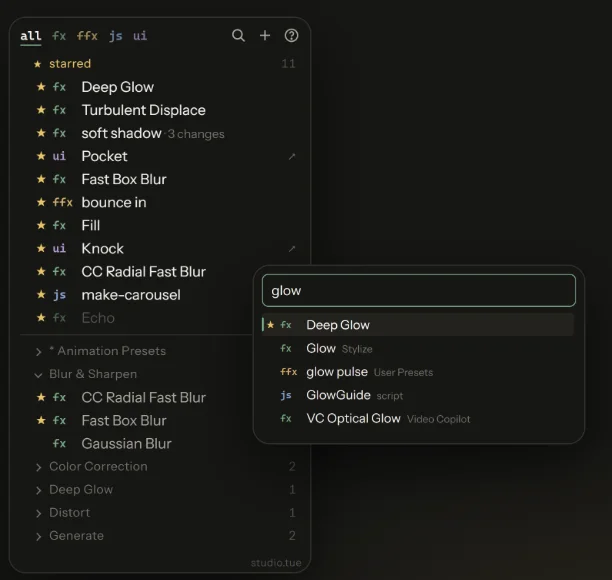
effects & presets makes you dig through folders for the same ten effects every day, and the tweaks you always make to them are gone the moment you close the comp. fx shelf keeps the effects, presets, scripts and panels you use on top, starred, with everything after effects has folded below the line.
your projects open and render the same on a machine without fx shelf: it only adds ordinary effects and presets.
- a shelf of your starseffects, presets, scripts and panels in one list, in your own order. click a row and it goes on all the selected layers as one undo.
- everything below the lineeverything after effects has, folded by category like effects & presets. hover a row and click its ☆ to star it.
- saved settingschange an effect, select it, press +. it's starred with your settings ("soft shadow · 3 changes"), and a click adds it exactly like that, expressions included.
- real presetswith keyframes or several effects, + opens after effects' own save dialog. presets saved in the
!FX Shelffolder are starred by themselves. - a search popupyour stars when it's empty, every effect, preset, script and panel when you type. enter applies it.
- suggest from this projectyour most-used effects in the open project, ready to star.
- filters and a how-tofx · ffx · js · ui filters, type-to-filter, two columns when docked wide, and a how-to window.
what you need
- price
- $5, pay what you want above that
- version of ae
- after effects 2023 or later
- platform
- windows
- type
- cep panel, signed
- included
- a .zxp, a drag-install zip, and a 3-page how-to
installing it3 steps
- install the zxpuse the free zxp/uxp installer with
FX-Shelf.zxpfor a signed one-click install. - or drag it inunzip
FX-Shelf-DragInstall.zipand drag the folder into%APPDATA%\Adobe\CEP\extensions\. - restart after effectsthen open it from window → extensions.
the 3-page how-to that comes with it walks through everything in the panel.
questions8
- what can i star?
- effects, presets, scripts and panels, all in one list, in your own order. everything after effects has sits below the line, folded by category like effects & presets: hover a row and click its ☆.
- how do i apply a starred effect?
- select your layers and click its row. it goes on all the selected layers as one undo. or open the search popup, type, and press enter.
- can it keep my effect settings?
- yes. change an effect, select it, press +. it's starred with your settings ("soft shadow · 3 changes"), and a click adds it exactly like that, expressions included.
- what about effects with keyframes?
- with keyframes or several effects, + opens after effects' own save dialog and saves a real preset. presets saved in the
!FX Shelffolder are starred by themselves. - how do i know which effects to star?
- suggest from this project lists your most-used effects in the open project, ready to star.
- what if i send the project to someone without fx shelf?
- it opens and renders the same. fx shelf only adds ordinary effects and presets.
- does it work on mac?
- no, it's windows only, after effects 2023 or later.
- how much is fx shelf?
- $5, and pay what you want above that if you like it. one license covers all your own machines, commercial work included.