← all tools
text and looks
wireframer
render what after effects shows you. in one press.
$5+windowsafter effects 2023 or later
pairs with pocketpicking layers for a wireframe is quicker in a tidy timeline. pocket puts them in folders, and nothing gets precomposed.
what it does8 things
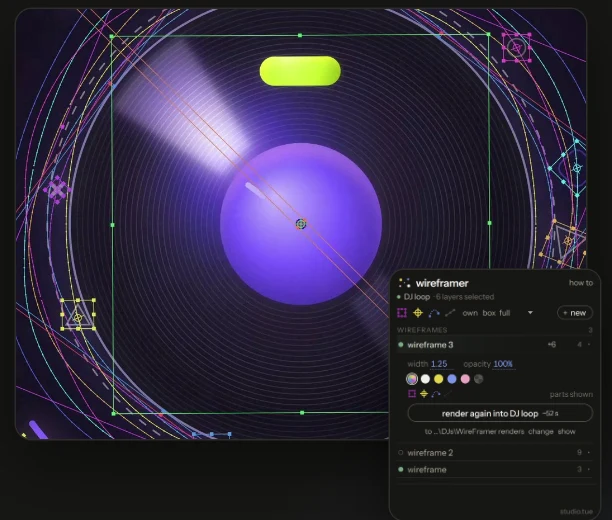
the boxes, handles, anchor points and motion paths you see while you animate are the best part of a breakdown, but after effects never renders them, so breakdowns end up as screen recordings or lines drawn by hand. wireframer draws them for the layers you pick, as real layers that move with your keyframes, then renders them see-through right on top of your comp.
your comp is never changed: wireframer builds a new wireframe comp next to it. every line is a plain shape layer with no expressions, so your project opens and renders the same on a machine without wireframer.
- handles, anchor points, motion paths, tangentseach one on or off. a layer moved only by its parent or an expression gets a trail of dots instead.
- box or fitafter effects' own layer box, or a box that hugs what you can see, so a png with empty space gets a snug box and a title's box grows as its letters come in.
- own colors or label colorsevery layer its own color, neighbors never alike, or their label colors, like after effects.
- a look you set while you watchdrag the line width and opacity, pick a color, choose which parts show.
- one press to rendera see-through prores 4444 placed on top of your comp. change the look and render again: it swaps into the same layer.
- add layers lateradd more layers to a wireframe with +, and draw only the layers you select.
- 3d layersdrawn the way the active camera sees them.
- faster rendersfull, half or quarter size wireframe comps.
watch it35 seconds
what you need
- price
- $5, pay what you want above that
- version of ae
- after effects 2023 or later
- platform
- windows
- type
- cep panel, signed
- included
- a .zxp, a drag-install zip, and a 3-page how-to
installing it3 steps
- install the zxpuse the free zxp/uxp installer with
WireFramer.zxpfor a signed one-click install. - or drag it inunzip
WireFramer-DragInstall.zipand drag the folder into%APPDATA%\Adobe\CEP\extensions\. - restart after effectsthen open it from window → extensions.
the 3-page how-to that comes with it walks through everything in the panel.
questions10
- can after effects render motion paths and bounding boxes?
- not on its own. the boxes, handles and motion paths you see while you animate are drawn in the viewer only, so they never reach a render. wireframer draws them for the layers you pick, as real layers that move with your keyframes, and renders them see-through on top of your comp. there's also a guide to doing it by hand.
- does wireframer change my comp?
- no. it builds a new wireframe comp next to it and places the render on top. your own layers aren't changed.
- what does it render?
- a see-through prores 4444, placed on top of your comp. change the width, color or parts and render again: it swaps into the same layer.
- what's the difference between box and fit?
- box is after effects' own layer box. fit hugs what you can see, so a png with empty space gets a snug box and a title's box grows as its letters come in.
- what about layers moved by a parent or an expression?
- a layer moved only by its parent or an expression gets a trail of dots instead of a motion path.
- does it work with 3d layers?
- yes. they're drawn the way the active camera sees them.
- how is wireframer different from cyclops?
- cyclops ($30 on aescripts, mac and windows) renders what after effects shows on screen, the composition or the whole window, to an mp4 or a png sequence. wireframer builds the boxes, handles and paths as plain shape layers in a new comp, so you set their look, and renders them see-through on top of your comp. it's $5, on windows.
- what if i send the project to someone without wireframer?
- it opens and renders the same. every line is a plain shape layer with no expressions.
- does it work on mac?
- no, it's windows only, after effects 2023 or later.
- how much is wireframer?
- $5, and pay what you want above that if you like it. one license covers all your own machines, commercial work included.